
Use our free tool to generate free World Cup Bingo Cards. Print them out and play with friends as the tournament unfolds!
FIFA World Cup Bingo
Customise Your Card
Tap to start
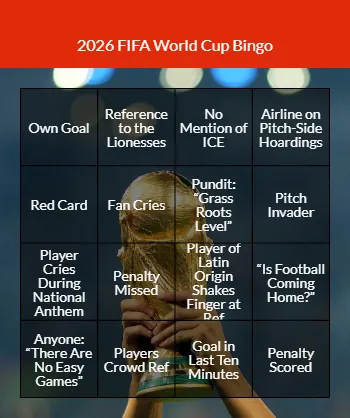
2026 FIFA World Cup Bingo
BINGO
Own Goal
Reference to the Lionesses
No Mention of ICE
Airline on Pitch-Side Hoardings
Red Card
Fan Cries
Pundit: “Grass Roots Level”
Pitch Invader
Player Cries During National Anthem
Penalty Missed
Player of Latin Origin Shakes Finger at Ref
“Is Football Coming Home?”
Anyone: “There Are No Easy Games”
Players Crowd Ref
Goal in Last Ten Minutes
Penalty Scored
World Cup Bingo 2026
The World Cup is finally upon us! From 11th June to 19th July, 48 teams from around the globe (up from the usual 32) will battle it out in stadiums across Canada, Mexico and the Unites States to become the champions of the world. The current holders are Argentina, who defeated previous winners France in a nailbiting penalty shootout back in 2022.
This time round Spain are most fancied, due to their almost flawless progress through the qualifiers.
We know that people from all over the world use our bingo card generators but if you’re a Brit, you’re probably most interested in when England (Group L) and Scotland (Group C) are playing. Here’s when (and where) they lined up in the group stage (times are BST not local time):
- Sunday 14th June 2am – Scotland played Haiti at the Boston Stadium – Scotland WIN
- Wednesday 17th June 9pm – England played Croatia at the Dallas Stadium – England WIN
- Friday 19th June 11pm – Scotland played Morocco at the Boston Stadium – Scotland LOSE
- Tuesday 23rd June 9pm – England played Ghana at the Boston Stadium – DRAW
- Wednesday 24th June 11pm – Scotland played Brazil at the Miami Stadium – Scotland LOSE
- Saturday 27th June 10pm – England played Panama at the New York/New Jersey Stadium – England WIN
16 teams were eliminated in the group stage. The top two teams in each group plus the eight best third placed teams across all the groups progressed to the Round of 32 which began on 28th June. The rest of the tournament is knockout style.
Scotland sadly did not make it through to the Round of 32, but England did, and beat DR Congo, Mexico and Norway to reach the semi finals. They played Argentina at 8pm UK time on 15th July and sadly, that’s as far as it went. They finished in third place. Roll on 2027 for the women’s game and 2030 for the men’s.
World Cup Bingo Cards
To celebrate the most popular sporting event on earth, we’ve created World Cup Bingo Cards. They contain in-game events and tired commentator/pundit clichés that you’re sure to encounter throughout the tournament.
How To Play World Cup Bingo
As with standard bingo games, all you’ve got to do is mark off the items as they occur. You can play alone or with friends, over one match or following your favourite team through the tournament stages. Here’s how it works:
- Tap to Start
- Select your card size – if you don’t want the default 4×4 you can change to 3×3 or 5×5 using the dropdown menu in the Grid Size box. We suggest using a smaller size for playing during a single match and a larger size for playing over several matches.
- Add any extra items you’d like to appear on your cards in the box where it says “Enter words/emojis” (and remove any of ours you don’t like)
- Press “Generate Bingo Cards“
- You’ll see an example, playable card (touch or click on an item to make the square change colour)
- If you want printable cards, choose a number of cards to print (from the drop down or enter a number in the “custom number” box). Then press “Generate Printable Cards” to produce a set of cards which will all be different from each other.
- If you don’t have a printer you can invite your friends by entering their email addresses in the box and pressing Invite – you’ll each receive a link to a different card which can be printed or played online.
- We recommend printed cards if you’re going to be playing over several sessions.
- Watch the match together – either in the same room or via a watch party – and daub the items off as they happen, online or on printed cards. The winner is the first to complete a line, or the player who is closest by the end of the match.
- If you’re playing over multiple matches you’ll probably want to continue the game and play for full house (marking off everything on your card or being closest to doing so).
- Enjoy, and don’t forget to shout Bingo when you complete a line!
How it works?

Choose a theme to start building your free custom bingo cards

You can use our items and backgrounds or add your own.

All of the cards are printable and playable online

Generate a set of cards and you’ll each have a different card to play with.
Design Your Own
A template with instructions and step by step video tutorial for designing your own bingo cards for any occasion you like!
Design Your Own Bingo Cards
All our bingo cards are fully customisable – check out this video tutorial to learn how!